Everything You Need to Know About Wayfinding in Healthcare, All in One Spot

Everything health systems need to know about digital wayfinding — from the real cost of lost patients to choosing the right technology, evaluating vendors, and deploying in MyChart.
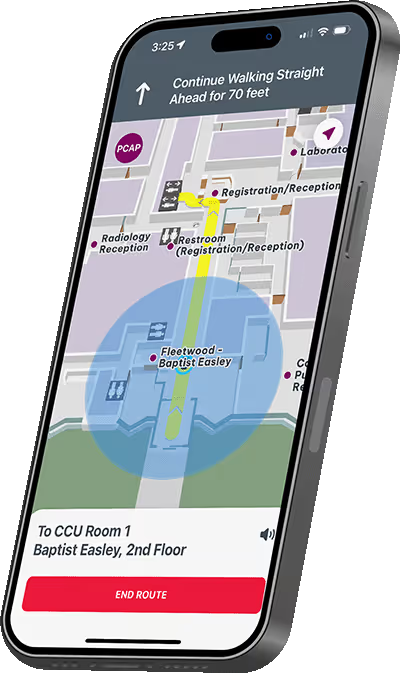
Mobile phone displaying indoor navigation map directing to CCU Room 1 at Baptist Easley, showing route with yellow line and a blue location circle.

Getting There Shouldn’t Be the Hardest Part of Healthcare

Poor signage and unclear navigation burden patients and staff alike, leading to stress, late or missed appointments, and costly inefficiencies.

30%
of first-time hospital visitors report getting lost; over 85% ask for directions upon arrival
Source: Journal of mHealth ↗
$220K+
annual labor cost from lost patients at a single facility — staff average 40 hours/year giving directions
Source: PubMed Central ↗
43%
of patients have switched providers or avoided returning to one, partly because of navigation difficulty getting to their appointment
Source: Gozio × Harris Poll, 2026 Patient Research ↗
65%
of patients say navigating to an appointment makes them anxious before the visit even begins
Source: Gozio × Harris Poll, 2026 Patient Research ↗
25%
of hospital staff cannot find some destinations within their own campus
Source: SEGD – The Real Cost of Lost Patients ↗
70%
of patients say clear navigation guidance — turn-by-turn directions, parking, building maps — would influence their choice of provider
Source: Gozio × Harris Poll, 2026 Patient Research ↗

What Makes Indoor Navigation in Healthcare So Challenging

Hospitals are among the most complex environments for navigation. GPS alone falls short indoors, and off-the-shelf tech often can’t keep up.

Physical Interference

Thick walls, medical equipment, and large crowds disrupt positioning signals. Concrete and steel block or reflect radio waves unpredictably, making standard positioning unreliable.

Electronic Noise

Medical equipment emits energy that makes even a digital compass unreliable, limiting which signal technologies can effectively determine a device’s indoor location.

Structural Complexity

Multi-level buildings, unnamed hallways, skywalks, and sprawling campuses require deep understanding of facility structure to locate a device in a useful, actionable way.

High Accuracy Needed

A 20-foot GPS error outdoors keeps you on the same street. Indoors, that same error puts you in a completely different room, hallway, or floor — accuracy within a few meters is essential.

User Context Matters

Unlike driving navigation, hospitals need to understand whether someone is a patient, visitor, or staff to determine the best routes, accessibility needs, and relevant points of interest.

Constant Change

Construction, new wings, shifted departments, and temporary closures mean maps and routes must be easy to update quickly — or they’ll cause more confusion than they solve.

The Value of Location Awareness

Indoor positioning elevates the entire healthcare experience, not just getting from A to B.

01
Navigation
Guide users between locations with turn-by-turn directions, empowering them to make full use of everything a facility offers.
02
Contextual Content
Location awareness creates the opportunity to personalize the experience, directing attention to relevant areas of interest in real time.
03
Targeted Communication
Segment messages based on when and where someone is in real time, keeping updates relevant and actionable.
04
Automated Experiences
The physical-to-digital link can trigger key flows, streamlining experiences like check-in, check-out, and appointment reminders.
05
Accessibility
Help users discover assistive tools and surface wheelchair-accessible routes, lending confidence in navigating your facility.
06
Intelligence
Understand how users navigate and congregate within a location for compelling, actionable analytics that improve operations and planning.

The Impact Goes Beyond Navigation

Wayfinding delivers measurable returns across patient experience, operations, and revenue.

Reduce Missed Appointments

Average 32% reduction in missed appointments. Fewer no-shows means recovered revenue and better utilization.

Lower Patient Anxiety

Clear directions reduce navigation stress that compounds the anxiety patients already feel arriving at a hospital.

Relieve Staff Burden

Free staff from 40+ hours/year of giving directions. Reduce volunteer dependency and redirect time to patient care.

Staff Onboarding

New hires use wayfinding during onboarding — especially valuable during M&A activity and campus expansions.

Right Site of Care

Help patients discover ED, urgent care, and primary care options — reducing costly ER overuse.

Drive ROI

Patient retention, reduced call volume, higher revenue per encounter, and improved digital competitiveness.

Vendor Evaluation Worksheet

Not all wayfinding platforms are built for healthcare. Feature parity is table stakes — once vendors pass your core capability bar, four criteria separate partners built for long-term healthcare use from the ones that will cost you more after launch.

01
Deployment Flexibility

The platform should meet patients where they already are — inside a branded app, embedded in MyChart, or both. Vendors who require a separate navigation destination add back the friction you've worked to eliminate.

02
What Implementation Actually Looks Like

AI-assisted mapping tools shift QA burden to your team. Look for white-glove service — real people responsible for accuracy in your actual building, so your involvement is reviewing a finished product, not doing the work the AI left behind.

03
Who Owns Maintenance After Launch

Some vendors hand off and leave you to notice when it breaks. Others guarantee positioning accuracy, stand behind uptime, and proactively update as your campus changes — determining whether your investment stays accurate five years in or quietly degrades six months after launch.

04
Built for Healthcare, Not Adapted for It

Platforms adapted from retail or office carry risk that's easy to miss in a demo. Healthcare-native vendors design for accessibility and HIPAA compliance from the start — and can confirm how they handle any PHI or patient location data before it becomes a compliance issue.

Key Areas to Cover in Your RFP

Vendor credibility — healthcare-specific references, implementation track record, and strategic roadmap
Core capabilities — blue-dot navigation, outdoor-to-indoor handoff, accessible routing, multi-campus support
Map administration — who updates maps when departments move, what's self-service vs. vendor-dependent
Interoperability — EHR, scheduling, patient portal, digital signage, and API/SDK availability
Analytics — reporting included out of the box and access to raw location-based data
Data protection — encryption, PHI handling, HIPAA compliance, and device authentication
Cost structure — what's included vs. billed separately, and how costs scale with usage
Support model — staffing expectations, escalation process, and SLA commitments

Must-Have Wayfinding Features

When evaluating a healthcare wayfinding platform, these are the table-stakes capabilities organized by category. Anything less puts patient experience and ROI at risk.

Navigation
Indoor Blue-Dot Navigation

Real-time positioning with turn-by-turn guidance through your facility, not just outdoor maps.

Outdoor-to-Indoor Handoff

Seamless transition from driving directions to walking inside — patients never lose their way.

Multi-Campus Support

Single platform across all locations — hospitals, MOBs, urgent care, and ambulatory sites.

Accessibility Routing

Wheelchair-accessible paths, step-free routes, and assistive guidance for patients who need it.

Patient Experience
Deployment Flexibility

Deploy directly inside Epic MyChart or in your own mobile app, meeting patients where they already engage with you.

Appointment-Linked Directions

Pull location from the scheduled appointment so patients tap one button to be guided there.

Parking Guidance

Route patients to the right garage, level, and entrance — with save-my-spot for the return trip.

Intuitive Search

Patients find any department, provider, or point of interest instantly by typing a name — no menus to dig through.

Platform & Support
HIPAA Compliant

No third-party vendors in the navigation stack. Maps and positioning data stay in-platform.

Self-Service Updates

Marketing or facilities can update POIs, closures, and content without engineering tickets.

Analytics Dashboard

See where patients struggle, where they go, and how usage trends to inform operational decisions.

Healthcare-Specific Support

A vendor that understands EHR workflows, M&A complexity, and the realities of clinical operations.

How to Test Before You Commit

A solution can look flawless in a vendor demo and still fail in your actual building. Evaluate every capability on-site before you sign. At minimum:

  • Walk the full patient journey — from parking lot to exam room and back, as a first-time visitor
  • Deliberately try to break it: walk into a building and back out, miss a turn, get off on the wrong floor, restart mid-route
  • Test across diverse routes: lobbies, parking decks, skybridges, cafeterias, hallway intersections, and limited-access areas — not just the lobby-to-front-desk path
  • Verify accessibility features in practice: step-free routes, elevator-priority paths, high-contrast modes, and screen reader compatibility
  • Test in connectivity dead zones: basements, parking garages, and areas known for poor cell signal

Hear from Your Peers

Health systems across the country are using Gozio to transform patient navigation and drive measurable results.

“The wayfinding feature is absolutely invaluable—you’ve got to have it—but the added value of the other functionality, all in one place in the palm of your hand, is really what makes Gozio’s mobile offering unique. The ease of use is incredible.”

Debbie Laughery, VP of Marketing & Communications
WakeMed Health

“What we look for is a halo effect: a patient was able to easily find patient registration, the ATM, a place to eat. Baptist Access is critical for demonstrating our commitment to the holistic experience, including all the relevant touchpoints on the way to or from the appointment.”

Melanie Husk, SVP & Chief Consumer Officer
Baptist Health Jacksonville
Trusted by Leading Health Systems

Top Questions Health System Leaders Ask

The questions that come up most often when evaluating digital wayfinding for healthcare.

How long does it typically take to deploy wayfinding across a campus?
Most Gozio deployments take 8–12 weeks for a single facility, including site survey, beacon installation, map building, and content configuration. Multi-campus rollouts are phased to match your operational priorities. The MyChart deployment option can go live faster since no standalone app is required.
Do we need IT or facilities staff to maintain the beacons?
No. BLE beacons run on internal batteries that last 5+ years and require no power, network cabling, or ongoing recalibration. Gozio handles all beacon health monitoring proactively, and replacements are simple peel-and-stick swaps when batteries eventually need refreshing.
How is patient data handled? Is it HIPAA compliant?
Gozio is HIPAA compliant by design. The wayfinding platform uses proprietary mapping with no third-party vendors in the navigation stack, eliminating data-sharing risks. We sign BAAs and follow strict data handling policies aligned with your compliance team’s requirements.
Can wayfinding really reduce no-shows by the percentages you cite?
Yes — the 32% average reduction in missed appointments comes from customer-validated data across multiple deployments. Reductions vary by facility, baseline no-show rate, and how integrated wayfinding is with scheduling. We’ll share specific reference data with comparable health systems on request.
What if our facility has frequent construction or department moves?
Updating maps, routes, and POIs is self-service through Gozio’s content management dashboard — no engineering tickets required. Closures, detours, and new department locations can be pushed live in minutes. Beacon repositioning, when needed for major renovations, is supported by Gozio professional services.
Can wayfinding work in areas with poor connectivity, like basements or parking garages?
It should — and with enterprise-grade solutions, it does. Look specifically for offline or cached routing, since connectivity dead zones are exactly where patients need guidance most. Gozio’s platform pre-loads maps and routes to the device so navigation continues without a live network connection, covering basements, parking decks, and underground walkways seamlessly.
Does wayfinding support patients with accessibility needs?
Accessibility should be a core feature, not an add-on. Look for wheelchair-accessible and step-free routing, elevator-priority paths, high-contrast display modes, screen reader compatibility, and multilingual support for non-English speakers — all available out of the box, not bolted on later. Gozio builds these capabilities into the platform by default.
Do we have to choose between our existing app and MyChart?
No. Both deployment paths share the same underlying maps and positioning data, so many health systems run both simultaneously — embedding navigation in a branded app via SDK while also enabling it inside MyChart — without duplicating the mapping and content work. You get consistent, accurate wayfinding regardless of which surface your patients use.

Purpose-Built Wayfinding for Healthcare

Gozio Health partners with health systems to deliver the most accurate, reliable, and user-friendly wayfinding available today — designed exclusively for healthcare, from the way buildings are mapped to how routes are generated in complex clinical environments.

32%
Fewer missed appointments
77%
Higher patient satisfaction
200M+
Square feet mapped
2m
Indoor accuracy

Deploy Your Way

Deliver reliable, accurate blue-dot wayfinding wherever your patients are — through MyChart, a custom branded app, or your existing mobile application.

Custom Mobile App

Build a fully branded mobile experience with Gozio’s platform. Unify wayfinding, scheduling, bill pay, provider search, and more.

In MyChart

Deploy Gozio’s wayfinding directly within Epic MyChart. Meet patients where they already engage — no standalone app required. An Epic Toolbox solution.

SDK for Your App

Already have a custom app? Integrate Gozio’s wayfinding SDK directly. Same proven navigation without rebuilding.

Ready to Transform Patient Navigation?

Your patients deserve an easy experience from scheduling to arrival. See Gozio in action.

Book a Demo →